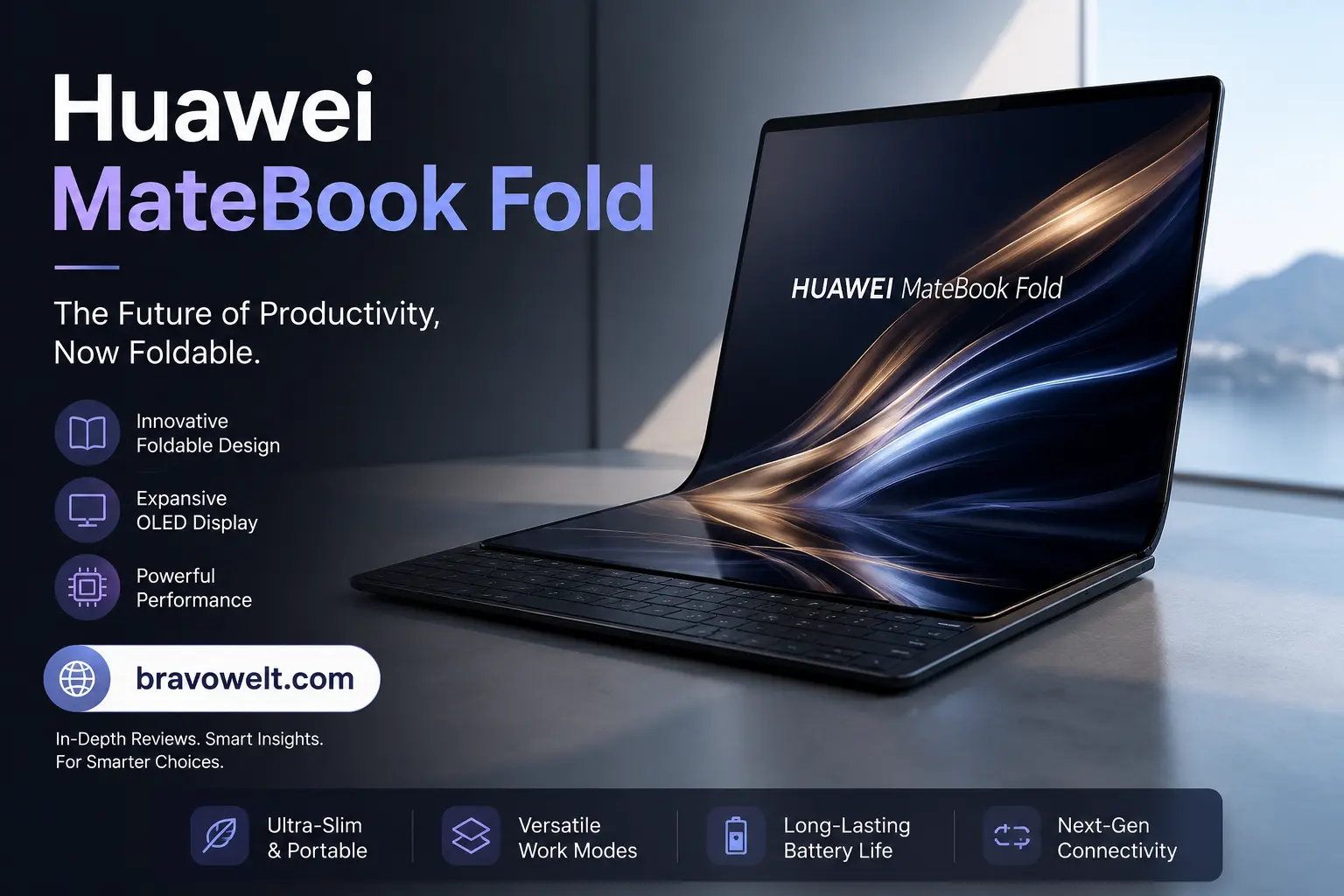
The Huawei MateBook Fold is one of the most ambitious foldable computing devices available in 2026, combining the portability of a conventional laptop with the workspace of a large tablet. Unlike a traditional clamshell notebook, it uses a flexible dual-layer OLED panel that opens into an 18-inch display and folds down into a much smaller 13-inch form factor.
The Huawei MateBook Fold has also moved beyond being a simple experiment in foldable hardware. The latest generation introduces the Kirin X90 Plus processor, HarmonyOS 6.1, native handwriting support, improved productivity features, and several memory and storage configurations. Huawei says the new model is designed around different working positions rather than a single fixed laptop posture.
That makes this device particularly interesting for professionals, creators, students, travelers, and technology enthusiasts who want a large canvas without carrying a conventional 16- or 18-inch notebook.
This guide explains the device from A to Z, including its design, display, processor, software, battery, keyboard, stylus support, pricing, availability, practical use cases, competitors, advantages, limitations, and whether it makes sense to buy one in 2026.
What Is the Huawei MateBook Fold?
The Huawei MateBook Fold is a premium foldable laptop designed to change its physical form depending on what you are doing. When opened completely, its flexible display provides an 18-inch workspace with a 4:3 aspect ratio. When folded, the device becomes much smaller and presents a 13-inch working area with a 3:2 aspect ratio.
The concept is different from a dual-screen laptop because there is one continuous flexible display rather than two permanently separated panels. This gives the computer a tablet-like surface when fully opened while still allowing a laptop-style configuration when partially folded and paired with its keyboard.
The current generation uses HarmonyOS 6.1 instead of Windows and is built around Huawei’s own PC ecosystem. Its hardware platform includes the Kirin X90 Plus processor, up to 32GB of memory, and up to 2TB of SSD storage.
In simple terms, it is designed for people who want three things from one computer: a compact device for transportation, a conventional laptop-style setup for typing, and a very large touchscreen workspace for multitasking or creative work.
Huawei MateBook Fold 2026 at a Glance
The latest 2026 generation focuses on improving the original foldable computer concept rather than simply increasing screen size. Huawei has added native handwriting support, updated the processor, refined the hinge system, and moved the software experience to HarmonyOS 6.1.
| Feature | 2026 specification |
|---|---|
| Operating system | HarmonyOS 6.1 |
| Processor | Kirin X90 Plus |
| Display | 18-inch unfolded / 13-inch folded |
| Panel | Dual-layer flexible OLED |
| Glass | UTG ultra-thin glass |
| Unfolded resolution | 3296 × 2472 |
| Folded resolution | 2472 × 1648 |
| Typical brightness | 700 nits |
| Peak HDR brightness | Up to 1600 nits |
| Color gamut | P3 |
| RAM | 24GB or 32GB |
| Storage | 512GB, 1TB or 2TB SSD |
| Weight | Approximately 1.16kg without keyboard |
| Unfolded thickness | 7.3mm on the right side |
| Folded thickness | 14.9mm |
| Wi-Fi | Wi-Fi 6 |
| Display ratio | 4:3 unfolded / 3:2 folded |
| Colors | Radiant Gold, Sky White, Phantom Black |
Huawei’s official specifications confirm the 18-inch unfolded panel, 13-inch folded configuration, 24GB/32GB memory options, and 512GB/1TB/2TB storage choices.
Huawei MateBook Fold Specifications
The hardware is designed around portability rather than the specification race commonly seen with large gaming or workstation laptops. The 2026 model combines a high-resolution foldable OLED display with substantial memory and storage, allowing it to handle demanding multitasking workloads without becoming physically large.
The Kirin X90 Plus is the central processing platform. Huawei rates the processor at a 28W TDP and says the combination of the processor, operating system, and hardware-software-cloud coordination improves overall system performance by 25% compared with the previous generation under its stated testing conditions.
Memory configurations start at 24GB and extend to 32GB, while storage ranges from 512GB to 2TB. That is important because foldable computers are expensive devices, and buyers need enough memory and storage for the type of work they expect to perform.
The display is equally important. It uses a dual-layer flexible OLED structure with UTG glass, a 92% screen-to-body ratio, P3 wide color gamut, and up to 1600 nits peak brightness for HDR content.
Huawei MateBook Fold Design and Build Quality
The biggest visual difference is immediately obvious: this is not shaped like a normal notebook. The chassis is designed around a flexible display, a folding mechanism, and a structure that can remain extremely thin despite containing a complete computer.
When unfolded, the device is only 7.3mm thick at its thinnest right-side measurement, while the closed thickness is 14.9mm. It weighs approximately 1.16kg without the keyboard, making the large-screen format surprisingly portable.
Huawei offers three exterior colors: Radiant Gold, Sky White, and Phantom Black. The design is positioned as a premium product rather than a rugged business machine, so its appearance is intentionally more refined and fashion-oriented.
The thin construction also explains why this computer should be handled differently from a conventional laptop. A foldable OLED panel and precision hinge introduce mechanical complexity that a fixed display simply does not have.
Huawei MateBook Fold Foldable Design Explained
The easiest way to understand the folding mechanism is to think of the computer as a large flexible sheet that can become a compact laptop. Fully opened, the screen gives you an expansive 18-inch canvas. Partially folded, it can create a more familiar laptop-style working arrangement.
This flexibility is one of the main reasons to choose a foldable PC. You are not buying the device merely because it folds; you are buying the ability to change the amount and orientation of workspace according to the task.
For reading or viewing large documents, the full display can provide a much more comfortable canvas. For typing, a physical keyboard can be positioned with the lower portion of the folded screen functioning as the display area.
For drawing, annotation, or handwriting, the large unfolded surface becomes particularly useful because there is significantly more room than on a standard laptop touchscreen.
Huawei MateBook Fold Hinge Technology
The hinge is one of the most important components because it determines how smoothly the display opens, closes, and holds different positions. Huawei uses what it calls the Xuanwu Waterdrop Hinge, designed to provide a flatter opening and stable hovering positions.
A foldable computer needs the hinge and flexible panel to work together. If the hinge applies uneven pressure, the display can suffer unnecessary mechanical stress. Huawei’s design therefore focuses on controlling how the two sides move during opening and closing.
The hinge also contributes to the different usage modes. Instead of having only open and closed positions, the computer can be positioned in ways that support laptop-style work, large-screen viewing, reading, presentations, or handwriting.
For owners, the practical lesson is simple: the hinge should be treated as a precision mechanism. Avoid forcing the display beyond its intended movement and avoid carrying the device in a way that places unnecessary pressure on the folded panel.
Huawei MateBook Fold 18-Inch OLED Display
The display is the defining feature of this computer. Fully opened, the flexible OLED panel measures 18 inches diagonally and uses a 4:3 aspect ratio. When folded, the working screen becomes a 13-inch panel with a 3:2 ratio.
An 18-inch 4:3 display provides considerably more vertical workspace than many conventional widescreen laptops. That can be useful for documents, spreadsheets, websites, research material, coding interfaces, and creative applications where vertical space matters.
The dual-layer OLED construction is paired with UTG ultra-thin glass. OLED technology allows individual pixels to produce their own light, which helps deliver deep blacks and strong contrast without relying on a traditional backlight.
Because the screen is flexible, the viewing experience is not identical to a fixed OLED monitor. The major advantage is flexibility and size; the trade-off is that users need to pay more attention to how they handle and transport the device.
Huawei MateBook Fold Display Quality and Resolution
The unfolded resolution is 3296 × 2472 pixels, while the folded half-screen configuration uses 2472 × 1648 pixels. Huawei lists a 92% screen-to-body ratio, making the display dominate the front surface.
At 18 inches, the high resolution is useful for displaying detailed images and keeping multiple windows visible at once. Instead of constantly switching between applications, users can arrange several pieces of information on the same workspace.
The 4:3 ratio is also significant. Most laptops use wider 16:10 or 16:9 displays, while the squarer panel gives more vertical room. That can make reading long documents or working with tall web pages more comfortable.
When folded, the 3:2 ratio becomes more laptop-like. This makes the smaller working area practical for everyday typing and conventional notebook tasks.
Huawei MateBook Fold Brightness, HDR and Color Performance
The display has a typical brightness rating of 700 nits and can reach up to 1600 nits peak brightness for HDR content according to Huawei’s laboratory measurements. It also supports P3 wide color gamut.
The high peak brightness is most relevant when viewing HDR material because HDR content can use bright highlights alongside darker areas. A high peak output can make these highlights more noticeable.
For creators, the P3 color gamut is important because it provides a broader color space than standard sRGB. However, professional color accuracy still depends on software, calibration, the specific application, and the workflow being used.
The display therefore has strong potential for photo viewing, graphic work, video consumption, presentations, and general productivity, although professional users should still verify application-specific color-management requirements before treating it as a dedicated reference monitor.
Huawei MateBook Fold Screen Crease and Durability
The crease is an unavoidable consideration with a flexible display. Unlike a traditional laptop screen, the panel has to bend repeatedly around a folding area, so users may notice a line or subtle visual difference where the display folds.
Huawei’s flexible OLED design and UTG glass are intended to provide durability while keeping the screen thin. However, no foldable display should be treated exactly like a conventional rigid laptop panel.
The safest approach is to open and close the device from the intended areas without pressing directly into the folding region. Keeping dust, grit, sharp objects, and excessive pressure away from the display is equally important.
For long-term ownership, the screen is one of the reasons the product commands a premium price. Buyers should therefore consider not only performance but also how carefully they can handle a precision foldable device.
Huawei MateBook Fold Processor and Performance
The 2026 model uses Huawei’s Kirin X90 Plus PC processor. Huawei describes it as a high-performance PC processor with a 28W TDP and says the new platform works with HarmonyOS to improve overall system performance and application startup behavior.
For everyday workloads, the hardware is designed to handle activities such as browsing, office applications, document editing, video calls, media consumption, and multitasking.
The key point is that this is a thin, portable foldable computer rather than a gaming workstation. Its performance priorities are responsiveness, mobility, efficiency, and integration with the operating system.
Users performing sustained professional workloads should therefore distinguish between short bursts of high performance and long-duration workloads that keep the processor heavily loaded. Physical size and thermal design naturally influence how much sustained performance a thin device can deliver.
Huawei MateBook Fold RAM and Storage Options
The available memory configurations are 24GB and 32GB, while storage options include 512GB, 1TB, and 2TB SSDs.
For ordinary office work, 24GB provides plenty of memory headroom. It becomes especially useful when many browser tabs, documents, communication applications, and productivity tools are open simultaneously.
The 32GB configuration is more attractive to users working with larger projects, creative applications, extensive multitasking, or heavier professional workflows.
Storage selection deserves similar attention. A 512GB drive can be enough for documents and cloud-based workflows, but 1TB is a safer choice for users who keep large media libraries locally. The 2TB option makes the most sense for creators or professionals who need substantial local storage and want to minimize dependence on external drives.
Huawei MateBook Fold AI Features
Artificial intelligence is becoming a standard part of modern PC software, but the useful question is not whether a device has “AI.” The more important question is what those features actually do.
HarmonyOS provides AI-assisted productivity capabilities, including tools that can help summarize, organize, rewrite, and format text in supported workflows. Huawei’s support documentation specifically describes AI functions for organizing notes, including summarization, layout, and rewriting.
The 2026 generation also introduces AI-related task assistance through Huawei’s software ecosystem. Some advertised features depend on the installed HarmonyOS version, with Huawei noting that certain Xiaoyi Task capabilities require HarmonyOS 7 or later.
For users, the practical benefit is reduced repetitive work. AI can help turn rough notes into structured information, improve written material, or organize information more quickly.
Huawei MateBook Fold Cooling and Thermal Performance
Cooling is particularly important in a thin foldable PC because the processor, battery, storage, and display electronics all have to fit into a highly constrained chassis.
The Kirin X90 Plus is rated at a 28W TDP, giving the device a meaningful performance target while keeping power consumption suitable for a thin mobile design.
During ordinary workloads, users are unlikely to push the processor continuously at its maximum level. Web browsing, documents, video calls, and office applications generally involve variable workloads rather than constant full CPU utilization.
Heavy sustained tasks are different. Long renders, extended compilation, intensive data processing, or demanding creative workloads can place more thermal pressure on a thin chassis. Buyers who regularly perform those jobs should consider whether portability is more important than maximum sustained performance.
Huawei MateBook Fold HarmonyOS Experience
HarmonyOS 6.1 is the operating system shipped with the current flagship configuration. This is one of the biggest differences between the device and traditional Windows laptops.
The software has been designed around Huawei’s broader ecosystem, including touch interaction, multi-window behavior, device integration, and different screen positions.
For users already invested in Huawei devices, this approach can make the computer feel more integrated. The operating system is not simply Windows placed on different hardware; Huawei has built its PC experience around its own platform.
However, switching operating systems requires consideration. People who depend on specific Windows-only applications should verify compatibility before purchasing because software availability can be more important than hardware specifications.
Huawei MateBook Fold App Compatibility
Software compatibility is one of the most important questions surrounding this computer. Hardware can be impressive, but a laptop ultimately needs to run the applications its owner depends on.
HarmonyOS has a growing application ecosystem, but it is not identical to Windows. Common productivity activities may be well supported, while specialized professional software can present a different situation.
This matters particularly for users who depend on niche enterprise software, legacy Windows programs, specialist engineering tools, certain development environments, or applications with strict Windows dependencies.
The best buying rule is simple: make a list of your five to ten most important applications and verify their HarmonyOS support before buying. Do not assume that an application available on a phone or tablet automatically provides the same desktop experience.
Huawei MateBook Fold Multitasking Features
The large unfolded display is designed specifically for multitasking. An 18-inch 4:3 workspace gives users room to arrange multiple applications without making each window excessively small.
For example, a student could keep research material on one side while writing notes on another. A business user could display a spreadsheet beside email and a presentation. A creator could keep a reference image visible while working on a design.
The folded configuration is better suited to conventional laptop work, while the fully opened configuration makes the most sense when screen real estate is the priority.
This flexibility is one of the strongest arguments for foldable computing because it changes the relationship between physical size and available workspace.
Huawei MateBook Fold Keyboard and Typing Experience
A large touchscreen is excellent for viewing and touch interaction, but serious writing still benefits from physical keys. The keyboard accessory allows the device to operate more like a conventional notebook.
The advantage is that users can choose between a touch-first workflow and a physical-keyboard workflow depending on the task.
For short messages, browsing, editing, and occasional writing, the flexible setup can be extremely convenient. For people who spend many hours typing every day, keyboard size, key travel, layout, and desk positioning become more important.
This is one area where a conventional laptop can still feel more straightforward. A fixed clamshell design gives the keyboard a permanent position, whereas a foldable computer gives the user more freedom but requires a little more setup.
Huawei MateBook Fold Stylus and M-Pencil Support
Native handwriting support is one of the significant additions to the 2026 generation. Huawei specifically promotes support for the HUAWEI M-Pen 3, allowing users to write, draw, annotate, and sign directly on the flexible display.
This feature changes the product from simply being a foldable notebook into something closer to a large digital canvas. Students can annotate documents, professionals can mark up presentations, and artists can use the large surface for sketches.
The large 18-inch workspace is especially useful for creative work because it provides more physical room than a typical laptop touchscreen.
For handwriting, the best experience will depend on application support and the user’s preferred pen workflow. Nevertheless, the addition makes the 2026 model significantly more attractive to people who actively use digital writing and drawing.
Huawei MateBook Fold Ports and Connectivity
Wireless connectivity includes Wi-Fi 6 with dual-band 2.4GHz and 5GHz support and 160MHz channel support according to Huawei’s specifications.
Because the chassis is exceptionally thin, port selection is an important consideration. Thin foldable computers generally cannot offer the same physical connectivity as larger business laptops.
Users who regularly connect multiple monitors, storage drives, wired networking equipment, cameras, or other peripherals should consider whether they will need a USB hub or docking solution.
For wireless-first users, this is less of an issue. For desk-based professionals with several accessories, connectivity should be considered before purchase rather than after.
Huawei MateBook Fold Camera and Audio Features
Video meetings remain an important part of modern laptop use, so the camera and microphone system matters even on a device primarily marketed around its display.
The earlier generation included an 8MP camera and multiple microphones and speakers, with independent hands-on reporting noting a six-speaker system and four microphones.
For video conferencing, the camera is useful for meetings, online classes, remote work, and calls. The large screen also makes video calls more comfortable when you want to keep other information visible.
Audio quality is equally relevant for media consumption and calls. Multiple speakers can create a more spacious listening experience than the tiny speaker systems found in some ultra-thin notebooks.
Huawei MateBook Fold Battery Life
Battery life depends heavily on brightness, workload, wireless usage, application behavior, and the selected power mode. A large OLED display can consume significant power when it is running at high brightness, especially during demanding workloads.
The device therefore makes the most sense when users understand that battery performance is not a single fixed number. A document-heavy workday can produce a very different result from continuous high-brightness video playback or processor-intensive tasks.
The 2026 model is designed around mobile productivity, so efficiency is an important part of the overall experience.
For travelers, the best approach is to carry the appropriate charger and avoid assuming that the largest screen will automatically deliver the same endurance as a smaller conventional notebook.
Huawei MateBook Fold Charging Speed
Charging speed matters more for a portable computer because users often carry it between meetings, classrooms, offices, and travel locations.
A fast recharge can restore useful battery capacity during short breaks, reducing the need to remain connected to a power outlet for long periods.
The charging experience also depends on the adapter and the device’s supported charging profile. Users should use compatible Huawei charging equipment or a suitable certified alternative rather than choosing a charger solely based on its advertised wattage.
For frequent travelers, charging flexibility can be nearly as important as raw battery capacity because the device is designed to replace several different types of computing equipment.
Huawei MateBook Fold Weight, Dimensions and Portability
Portability is one of the strongest hardware advantages. Huawei lists the weight at approximately 1.16kg without the keyboard. The unfolded dimensions are 382.5 × 288.5mm, while the closed dimensions are 288.5 × 193.7mm.
The folded thickness is 14.9mm, while the thinnest unfolded measurement is 7.3mm on the right side. That is remarkably thin for a computer that can transform into an 18-inch workspace.
The result is a device that can be carried more easily than its huge display size suggests. Travelers and mobile professionals benefit the most from this combination.
The keyboard adds to the total carrying weight, so anyone comparing the device with an ordinary ultrabook should consider the complete setup rather than the tablet-like computer alone.
For the latest updates and guides, visit our Designer Shoes.
How to Use the Huawei MateBook Fold in Different Modes
The defining benefit of a foldable computer is that one physical device can serve different roles.
Laptop mode: Use the folded screen with the physical keyboard for emails, documents, browsing, and conventional productivity.
Large-screen mode: Open the display completely when you need a large canvas for documents, spreadsheets, presentations, research, or creative applications.
Tablet-style mode: Use the full touchscreen for reading, drawing, browsing, annotation, and touch-based applications.
Vertical or rotated viewing: The large display can be positioned for different content types, making it useful for long documents, portrait-oriented material, and certain creative workflows.
Split-screen productivity: Arrange multiple applications across the large display to reduce constant window switching.
The key idea is that the device is not limited to one physical posture. Its usefulness comes from changing shape according to the activity.
Huawei MateBook Fold for Work and Productivity
For business users, the large screen can reduce the need to constantly switch between applications. A spreadsheet, email conversation, reference document, and presentation can potentially remain visible in one workspace.
The 4:3 unfolded ratio is especially useful for documents and vertical content. Users who spend much of their day reading reports or working with large tables may appreciate the additional vertical space.
The device is also useful for meetings. The compact folded form is easier to carry, while the large display can provide more room for notes and reference information during a video call.
However, business buyers should evaluate software compatibility carefully. Enterprises often depend on specialized Windows applications, and the operating system difference can be more significant than the hardware advantage.
Huawei MateBook Fold for Students
Students can benefit from the combination of a large display and portability. Research papers, lecture slides, notes, and reference material can be displayed together more comfortably than on many standard laptops.
The stylus adds another useful dimension. Students can annotate PDFs, mark lecture material, sketch diagrams, or write notes directly on the touchscreen.
The compact folded size also makes transportation easier between classes, libraries, and study spaces.
The biggest concern is price. This is a premium machine, so students should not choose it simply because the display is impressive. If the budget is limited, a conventional laptop and tablet combination may provide more practical value.
Huawei MateBook Fold for Content Creators
Content creators can take advantage of the large color-capable OLED display and expansive workspace. Photo editors, video planners, writers, designers, and social media professionals often benefit from having more room for timelines, references, assets, and editing tools.
The P3 wide color gamut is particularly relevant to creators working with color-sensitive material, although application support and professional calibration requirements should still be considered.
The stylus also adds value for sketching, annotation, and creative brainstorming.
The main limitation is software. Professional creators should verify whether their exact editing, design, audio, and publishing applications work properly on HarmonyOS before treating the device as a primary production machine.
Huawei MateBook Fold for Digital Artists
Digital artists are among the users who can benefit most from the flexible display. The unfolded 18-inch canvas offers substantially more working space than a small laptop touchscreen.
M-Pen support makes handwriting and drawing more natural, while the ability to position the computer differently can make certain creative workflows more comfortable.
The large screen can also be useful for viewing reference material beside the active canvas, reducing the need to switch between devices.
Still, professional artists should investigate the exact creative software ecosystem before buying. Pen hardware and screen quality are only part of a digital art workflow; application compatibility, brush libraries, file formats, color management, and performance are equally important.
Huawei MateBook Fold Price in 2026
The current 2026 flagship model starts at ¥24,999 in China. Huawei’s published configurations include 24GB RAM with 512GB storage at ¥24,999, 24GB with 1TB at ¥26,999, and 32GB with 2TB at ¥29,999.
That places the product firmly in the premium category. It is not priced like an ordinary ultrabook, and the premium reflects the flexible OLED panel, specialized hinge, thin construction, high memory capacity, and new computing platform.
The 512GB configuration is the entry point, while the 2TB version is aimed at users who need more local storage and memory.
International pricing should not be calculated by simply converting the Chinese price into another currency. Taxes, import costs, retailer margins, warranty coverage, and local availability can substantially change the final amount.
Huawei MateBook Fold Release Date
The 2026 generation was officially introduced in China on August 5, 2026, as part of Huawei’s new HarmonyOS computer lineup. The new model brought the Kirin X90 Plus processor, HarmonyOS 6.1, native handwriting support, and an 18-inch dual-layer OLED foldable display.
This is important because older articles can still describe the first-generation device and its original software platform.
Readers comparing specifications should therefore distinguish between the original generation and the updated 2026 model.
The 2026 version should be treated as the current reference point when discussing processor, operating system, configurations, and new software features.
Huawei MateBook Fold Availability and Global Launch
Availability is one of the most important buying considerations. The current official product information is centered on the Chinese market, and international availability should not be assumed simply because the product appears on global technology websites.
Third-party market listings can sometimes show imported units, but an imported device is not necessarily the same as an officially supported local product.
Potential buyers outside China should therefore consider warranty service, keyboard layout, charger compatibility, regional software availability, language support, repair options, and local after-sales support.
Until Huawei officially confirms broader market distribution, buyers should treat claims about a worldwide release date cautiously rather than relying on unofficial retailer listings.
Huawei MateBook Fold Review and Real-World Experience
The biggest strength of the device is the combination of a very large screen and relatively compact physical size. Independent hands-on testing of the earlier generation highlighted the display quality, thin body, flexible usage positions, magnetic keyboard concept, and relatively subtle crease.
In practical use, the large screen changes how multitasking feels. Instead of treating every application as a separate window that must be opened and closed, users can create a larger workspace.
The foldable format is also genuinely useful for travel. Carrying an 18-inch display normally means accepting a much larger laptop, while this design lets the screen collapse into a smaller footprint.
The main concerns remain software compatibility, premium pricing, foldable-display durability, and the compromises associated with an extremely thin design.
That makes the device impressive, but not universally suitable. It is best understood as a specialized premium productivity computer rather than an automatic replacement for every conventional laptop.
Huawei MateBook Fold Pros and Cons
Pros
- Huge 18-inch OLED workspace in a compact foldable form
- Approximately 1.16kg body weight without the keyboard
- Extremely thin construction
- High-resolution display
- 700-nit typical brightness and up to 1600-nit HDR peak
- P3 wide color gamut
- Up to 32GB RAM
- Up to 2TB SSD storage
- Kirin X90 Plus processor
- HarmonyOS 6.1
- Native M-Pen 3 support
- Multiple working positions
- Strong portability for its screen size
Cons
- Very high purchase price
- Software ecosystem is different from Windows
- Some specialized applications may not be available
- Foldable display requires careful handling
- Limited physical-port flexibility compared with larger laptops
- Keyboard experience may not satisfy heavy typists
- International availability remains a consideration
- Professional buyers must verify application compatibility
The balance is therefore straightforward: the product offers extraordinary flexibility and portability, but users pay a substantial premium for that experience.
Huawei MateBook Fold vs Traditional Laptops
A traditional laptop is simpler. Its screen does not fold, its keyboard is permanently attached, and the operating system ecosystem is usually more mature for mainstream desktop applications.
The foldable alternative wins when screen flexibility and portability are the priority. An 18-inch workspace can provide much more room than a conventional 13- or 14-inch notebook while the folded device remains comparatively compact.
Traditional laptops generally win on keyboard ergonomics, software choice, repair simplicity, and often sustained performance per dollar.
The decision therefore depends on what problem the buyer is trying to solve. If the goal is maximum productivity flexibility in a portable package, the foldable design is compelling. If the goal is maximum value or compatibility, a conventional notebook may be the safer choice.
Huawei MateBook Fold vs Lenovo ThinkPad X1 Fold
The Lenovo ThinkPad X1 Fold is one of the most recognizable competitors in the foldable PC category. The two products share the same fundamental idea: transform a flexible display into different computing configurations.
The newer Huawei device has a larger 18-inch unfolded display and a very thin 7.3mm minimum unfolded profile. A current comparison listing shows the Huawei model with 32GB RAM, 2TB storage, and a 3296 × 2472 display, compared with the older ThinkPad X1 Fold configuration’s 13.3-inch screen and 8GB RAM.
Lenovo’s major advantage is familiarity with the Windows and business-PC ecosystem. That can be extremely important for organizations that depend on enterprise software.
Huawei’s advantage is its newer hardware direction, larger display, extremely thin design, and HarmonyOS integration.
For a business user who needs Windows compatibility, the Lenovo approach may remain more practical. For someone prioritizing a large foldable canvas and Huawei’s ecosystem, the newer device has a distinctive advantage.
Huawei MateBook Fold vs ASUS Zenbook Fold
The ASUS Zenbook Fold is another important comparison because it helped establish the premium large-screen foldable laptop category.
The basic concept is similar: a flexible OLED screen can function as a large display when open and become a smaller laptop-style device when folded.
The Huawei design pushes the concept further with an 18-inch display and an exceptionally thin chassis. Its unfolded resolution reaches 3296 × 2472 pixels, while the device weighs approximately 1.16kg without the keyboard.
The biggest difference is the software ecosystem. ASUS foldable models are associated with Windows, while the current Huawei flagship runs HarmonyOS 6.1.
That means the choice is not purely about screen size or hardware. Users should compare application compatibility, keyboard experience, regional support, price, and their existing software ecosystem before deciding.
Huawei MateBook Fold vs Other Foldable Laptops
The foldable laptop market has changed significantly since the first-generation products appeared. Early models proved that flexible displays could be used in computers, but newer devices are increasingly focused on making the form factor practical.
The current Huawei model stands out because of its combination of an 18-inch screen, 13-inch folded configuration, very thin chassis, high memory capacity, and native pen support.
Other foldable laptops may offer stronger Windows compatibility, more established enterprise support, or different keyboard designs.
There is no single winner for everyone. The right choice depends on whether the buyer values software compatibility, screen size, portability, creative input, or ecosystem integration most.
Can the Huawei MateBook Fold Replace a Traditional Laptop?
For many everyday users, it can perform the basic role of a laptop: browsing, document editing, communication, media consumption, presentations, and general productivity.
Its large screen can actually improve some workflows because users have more space for multiple windows.
However, replacement becomes more complicated when specialized software is involved. Windows-dependent applications, enterprise tools, professional engineering software, or niche desktop programs may not have equivalent HarmonyOS versions.
The physical keyboard is another consideration for people who type continuously for many hours.
Therefore, the most accurate answer is that it can replace a traditional laptop for the right user, but it should not automatically be considered a universal Windows laptop replacement.
Is the Huawei MateBook Fold Worth Buying in 2026?
It is worth considering if you specifically value a large foldable workspace, premium portability, handwriting support, and Huawei’s software ecosystem.
The hardware is clearly ambitious. An 18-inch OLED display, 32GB maximum memory, 2TB storage, a modern Kirin processor, and a roughly 1.16kg body create a combination that conventional laptops struggle to reproduce.
The price, however, means buyers should have a clear reason for choosing the foldable format. If a normal laptop already meets your needs, paying a premium simply for novelty may not be sensible.
Software compatibility should also be checked before purchase. For a user whose important applications work well on HarmonyOS, the advantages can be substantial. For someone dependent on Windows-only software, the limitations can outweigh the benefits.
Who Should Buy the Huawei MateBook Fold?
This computer makes the most sense for users who value flexibility more than conventional laptop simplicity.
It is particularly attractive for:
- Professionals who need a large portable workspace
- Frequent travelers
- Digital nomads
- Researchers working with multiple documents
- Students who use handwriting and annotation
- Designers and digital artists
- Creators who benefit from a large touchscreen
- Huawei ecosystem users
- Technology enthusiasts interested in next-generation computing
It can also appeal to executives and business users who want a premium presentation and productivity device.
The strongest buyer is someone who can take advantage of the unique form factor rather than someone simply looking for the cheapest computer with good specifications.
Who Should Avoid the Huawei MateBook Fold?
Buyers should think twice if they depend heavily on Windows-exclusive software.
It may also be a poor fit for users who prioritize the lowest possible cost, maximum gaming performance, long-term repair simplicity, or a permanently attached full-size keyboard.
People who frequently connect several wired accessories should also evaluate the available ports and whether a hub would be necessary.
Finally, anyone uncomfortable with the additional care required by a foldable display may be happier with a conventional laptop.
A normal notebook is not inferior simply because it does not fold. For many people, simplicity is actually an advantage.
The Future of Huawei MateBook Fold and Foldable Laptops
Foldable computing is moving from an experimental idea toward a more clearly defined premium category. The important development is not simply that displays can fold; it is that manufacturers are finding practical reasons for users to want that flexibility.
Huawei’s 2026 generation demonstrates this shift by combining a large 18-inch workspace with a compact folded configuration, stylus support, a dedicated PC processor, and an operating system designed around multiple device positions.
Future generations will likely focus on making flexible displays thinner, stronger, brighter, and more affordable while improving software designed specifically for changing screen configurations.
Software will be just as important as hardware. A foldable computer becomes significantly more valuable when applications automatically adapt to different screen modes and when AI tools can understand the user’s workflow.
The long-term success of this category will therefore depend on both hardware durability and ecosystem maturity.
FAQs
What is the Huawei MateBook Fold?
It is a premium foldable computer that transforms from an 18-inch large-screen workspace into a compact 13-inch folded configuration. The current generation uses HarmonyOS 6.1 and the Kirin X90 Plus processor.
How large is the display when fully opened?
The flexible OLED panel measures 18 inches diagonally when fully unfolded and uses a 3296 × 2472 resolution with a 4:3 aspect ratio.
How large is the screen when folded?
The folded working configuration provides a 13-inch display area with a 2472 × 1648 resolution and a 3:2 aspect ratio.
What processor does it use?
The 2026 flagship generation uses Huawei’s Kirin X90 Plus processor with a rated 28W TDP.
How much RAM is available?
The current specifications list 24GB and 32GB memory configurations.
How much storage does it have?
Available SSD options include 512GB, 1TB, and 2TB.
What operating system does it use?
The current flagship model ships with HarmonyOS 6.1. Some newer AI functions may depend on later operating-system updates.
Does it support a stylus?
Yes. The 2026 generation introduces native handwriting support and is designed to work with the HUAWEI M-Pen 3.
How bright is the OLED display?
Huawei lists 700 nits typical brightness and up to 1600 nits peak brightness when displaying HDR content.
Does the screen support a wide color gamut?
Yes. Huawei lists P3 wide color gamut support for the display.
How much does the device weigh?
The computer itself weighs approximately 1.16kg without the keyboard, although the actual weight can vary by configuration and manufacturing factors.
How thin is it?
The unfolded chassis measures as little as 7.3mm on the right side, while the folded thickness is 14.9mm.
What is the starting price in 2026?
The current 2026 flagship model starts at ¥24,999 in China for the 24GB RAM and 512GB storage configuration.
Is the device available globally?
The current official launch information is focused on China. Buyers in other markets should wait for official regional availability information rather than assuming that imported listings represent an official local launch.
Can it run Windows?
The current flagship uses HarmonyOS rather than Windows. Users who require Windows-exclusive software should verify application compatibility before purchasing.
Is it good for students?
It can be particularly useful for students who read documents, annotate PDFs, multitask between research and writing, or use a stylus for notes. The biggest drawback is its premium price.
Is it good for digital artists?
The large OLED canvas and M-Pen support make it attractive for digital art and annotation. Professional artists should still confirm that their preferred creative applications are supported by the operating system.
Can it replace a desktop computer?
For general productivity, it can replace many desktop-style workflows. It is less suitable as a complete desktop replacement for specialized applications, intensive sustained workloads, or users who need extensive wired connectivity.
Is a foldable laptop better than a normal laptop?
Neither is universally better. A foldable computer provides greater flexibility and screen area for its size, while a traditional laptop generally offers simpler construction, wider software compatibility, and a more conventional keyboard experience.
Conclusion
The Huawei MateBook Fold represents a different approach to personal computing: instead of making a conventional laptop slightly thinner or faster, it changes how the computer itself is used. Its 18-inch flexible OLED display can become a large productivity canvas, while the folded form remains compact enough for mobile work.
The 2026 generation strengthens that concept with the Kirin X90 Plus processor, HarmonyOS 6.1, up to 32GB RAM, up to 2TB storage, improved hinge technology, and native M-Pen support.
Its weaknesses are equally important. The premium price, HarmonyOS application ecosystem, foldable-display considerations, and regional availability mean that it is not automatically the best laptop for every buyer.
For someone who wants a conventional Windows machine at the lowest possible cost, a traditional laptop remains the safer choice. For someone who wants a premium, portable, large-screen computer with multiple physical configurations, the foldable approach offers something genuinely different.
Ultimately, the value of this product comes down to whether its unique form factor solves a real problem in your daily workflow. If the large display, portability, handwriting capability, and flexible modes can replace several devices or significantly improve productivity, the premium becomes easier to justify. If those features are mostly attractive because they are unusual, a conventional laptop may provide better overall value.
For the latest updates and guides, visit our Zepbound Savings Card.